

Webflow Cookie Consent in 2026: 8 Publish Checks for Scripts, CMPs, and Live Tracking
A useful guide to webflow cookie consent should help readers understand both the rule and the behavior behind the rule. That is where consent topics become genuinely practical instead of sounding like recycled compliance copy.
The linked DataShyre articles cover the nearby topics, while this explainer should stay focused on plain-English direction for publishers, operators, and marketers.
That is the right frame because the official materials are fairly direct now. Webflow’s March 26, 2026 consent guidance says you can use a CMP app or integration, connect an existing CMP through Webflow’s APIs, or build your own solution with custom code. Webflow’s consent-management developer docs also say their example is a starting point that “may not fully comply with all privacy laws.” The European Commission still says consent requests should use “clear and plain language” and that withdrawal should be as easy as giving consent. CNIL still says “rejecting cookies should be just as easy as accepting them.” Google still says consent defaults should be set “before any commands that send measurement data.”
If you want nearby context first, start with these guides to website privacy checker, cookie consent Google Tag Manager, and cookie consent requirements USA. This article stays focused on the publish-time review I would run before trusting webflow cookie consent on a production site.

1. Separate Webflow’s own tracking controls from everything else
This is the first distinction that changes the implementation plan.
Webflow’s consent APIs and tracking settings are tied to Analyze and Optimize. That matters if you actively use those products. It does not automatically control every third-party analytics tag, ad pixel, chat widget, video embed, map, A/B script, or custom code block you add elsewhere.
So for webflow cookie consent, the first scoping question is not “Do we have a banner?” It is “Which technologies does this banner actually control?”
If the team cannot answer that cleanly, the rest of the review gets much harder to trust.
2. Pick the tracking default on purpose and verify it on the live domain
Webflow’s current tracking settings still offer three meaningful defaults once tracking is turned on:
Always track visitorsLet visitors opt outDon't track by default
Webflow also says that if you choose Let visitors opt out or Don't track by default, you need a consent management solution or Analyze and Optimize will not function properly. It also says you must publish your site for those changes to take effect.
That makes one live check surprisingly important: confirm that the published domain is actually running the tracking default your team believes it selected in Webflow.
If the configuration changed in the dashboard but the site was not republished, your documentation can be correct while your runtime behavior is still stale.
3. Load the CMP before optional scripts, not after them
This is where clean-looking setups often fail.
Webflow’s March 9, 2026 OneTrust app guidance says the SDK should load first, or very close to first, in the before other scripts and before the page loads. The same guidance says third-party scripts should be managed through the app instead of being dropped directly into site custom code.
That is useful beyond OneTrust. It points to the wider rule for webflow cookie consent:
- the consent layer should load before optional tracking logic;
- custom code should not quietly bypass that layer;
- embeds and page-specific scripts should be reviewed as separate risk points; and
- the published site should be tested, not just the project settings.
Webflow’s own custom-code documentation reinforces the same operational reality. Scripts can be placed in the or before , page-level code appears after site-wide code, and changes do not go live until the site is published.
4. Treat Webflow’s consent examples as implementation starters, not legal clearance
This is one of the clearest signals in the current docs.
Webflow’s developer documentation says its sample consent banner is intended only as a starting point and “may not fully comply with all privacy laws.” That is a helpful warning, not a weakness.
It means a serious webflow cookie consent review should not stop at “the example works.” It should ask:
- does the banner language match the purposes actually in use;
- are rejection and later withdrawal genuinely usable;
- does the second layer explain optional purposes in plain language;
- does the site’s privacy notice still match the live behavior.
The European Commission’s current guidance is still a good calibration point here because it says the request for consent should be clearly visible, use clear and plain language, and explain that withdrawal is possible through a method that is as easy to use as giving consent.
5. Test no-choice, reject, accept, and withdrawal as separate states
Many teams still test the accepted state first because it is the easiest one to see in dashboards.
That is the least useful state.
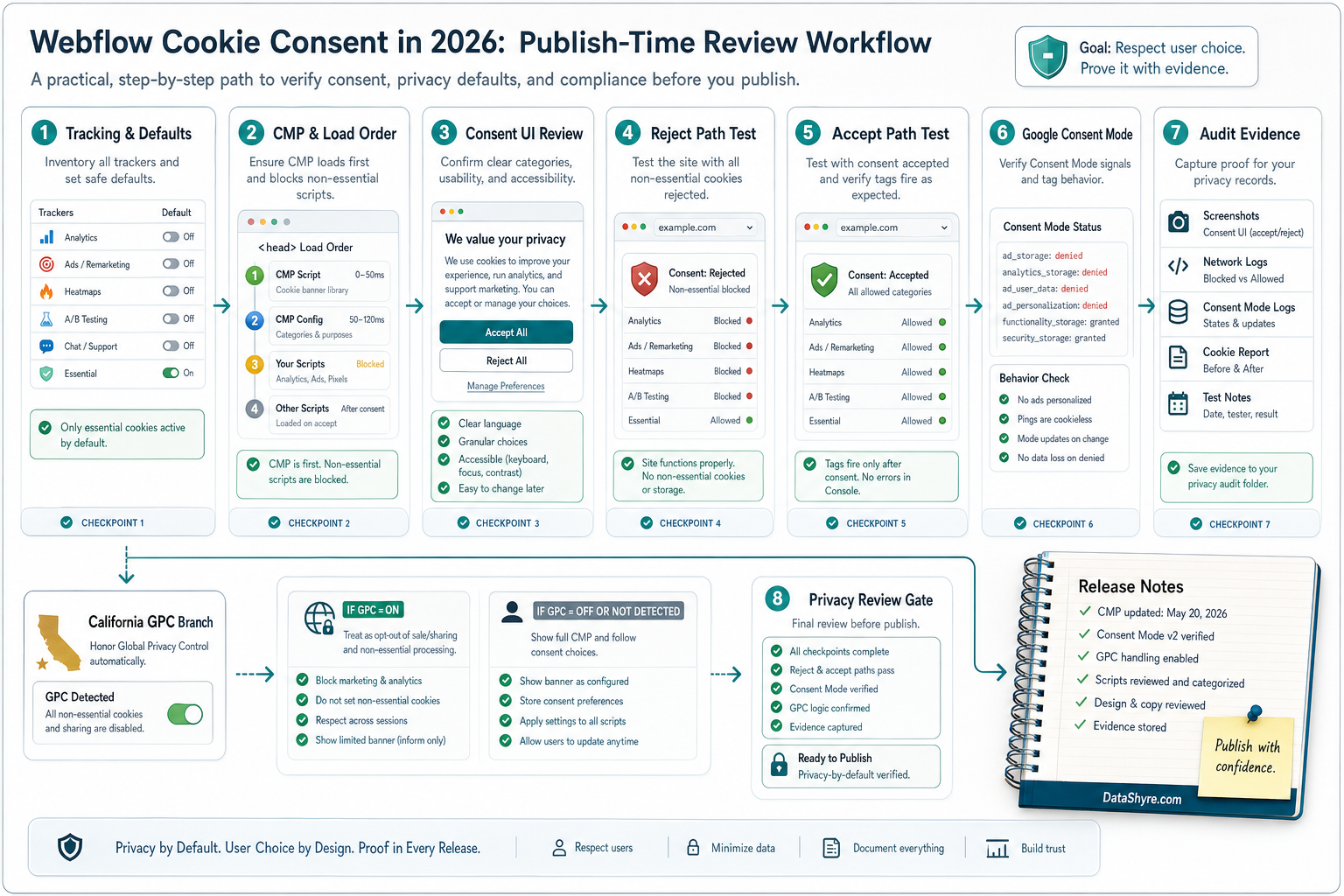
For a serious webflow cookie consent review, I would test at least these four conditions on the published site:
- first load with no choice yet;
- explicit reject;
- explicit accept all; and
- later withdrawal from the preference center or settings link.
CNIL’s current cookie-banner enforcement remains practical here. It says the information on the banner must be clear and complete, and “rejecting cookies should be just as easy as accepting them.”
So the live question is not only whether the interface shows both buttons. It is whether the network and storage behavior changes the way those buttons suggest it will.
6. If Google tags are present, verify denied defaults and on-page updates
A large share of Webflow sites still route analytics or advertising through Google tags, either directly or through Tag Manager.
Google’s current consent-mode guidance still says you should call the default consent command on every page before any commands that send measurement data and that consent updates should be tracked on the page where they occur, before any page transition.
That makes the technical review for webflow cookie consent much more concrete:
- are denied defaults set early enough where consent is required;
- do updates fire immediately after the visitor acts;
- do
analytics_storage,ad_storage,ad_user_data, andad_personalizationalign with the intended regional behavior; and - do non-Google scripts still need their own gating even if Google tags are configured correctly.
If the tag order is wrong, the banner can look compliant while the measurement layer is already late.
7. Keep California and publisher-ad rules in a separate branch
This is where teams often blend unlike requirements together.
California’s Department of Justice still describes the Global Privacy Control as a “stop selling or sharing my data switch” and says covered businesses must honor it as a valid opt-out request. Its main CCPA page, last updated on August 28, 2026, still says consumers may opt out of sale or sharing, including through a user-enabled GPC.
That is one branch.
Another branch appears if the site serves personalized ads through AdSense, Ad Manager, or AdMob. Google’s current publisher help still says a Google-certified CMP integrated with the IAB Transparency and Consent Framework is required when serving personalized ads to users in the EEA and UK and, separately, in Switzerland. The same help page also says Google does not check CMPs for full compliance with privacy laws.
Those checks can overlap, but they are not interchangeable. A site can be organized around California opt-out handling and still fail a publisher-specific ad requirement. The reverse can also happen.
8. Re-test after every publish and keep evidence another team can read
This is the part that turns webflow cookie consent from a one-time project into an operating control.
Webflow sites change fast. A designer republishes after a layout tweak. Marketing pastes a new embed into page settings. A CMP category changes. An analytics script gets re-added outside the approved path.
So after meaningful changes, I would keep at least this evidence pack:
- screenshots of the first layer on desktop and mobile;
- notes for no-choice, reject, accept, and withdrawal states;
- a short inventory of optional technologies observed before and after consent;
- any California or publisher-specific branch notes that apply; and
- the publish date or release ticket tied to the review.
That record survives the next release much better than “the banner looked fine when we launched.”
A short review order for this week
If you were reviewing webflow cookie consent today, I would do it in this order:
- inventory which technologies are controlled by Webflow itself and which are external;
- verify the intended tracking default in Webflow and confirm the live domain was republished;
- inspect whether the CMP or consent layer loads before optional scripts;
- test no-choice, reject, accept, and withdrawal on the published site;
- check Google tag defaults and updates if Google tags are present;
- test any California GPC or publisher-ad branch that applies; and
- save enough evidence to repeat the review after the next release.
That order usually reveals more than another banner redesign.
FAQ
Does Webflow include a full legal cookie-consent solution by itself?
No. Webflow offers tracking settings, consent APIs, CMP integrations, and implementation examples, but its own developer documentation says the example may not fully comply with all privacy laws.
Is publishing really part of the consent review?
Yes. Webflow’s help and custom-code documentation both make clear that tracking and code changes only take effect on the live site after publication.
If Google tags are configured correctly, are we done?
No. Google consent mode helps with Google tags. You still need to test other scripts, embeds, pixels, and region-specific branches that may live outside that path.
Bottom line
The strongest webflow cookie consent setup in 2026 is not the one with the nicest banner animation.
It is the one that scopes Webflow’s native controls correctly, sets the right tracking default, loads the CMP early enough, makes rejection and withdrawal genuinely usable, updates Google consent signals in time, keeps California and publisher-ad branches distinct, and stays testable after every publish.
Seen clearly, webflow cookie consent is less about a pop-up and more about whether the site behaves honestly after the visitor makes a choice.
Sources
- Webflow Help Center, Manage site tracking consent: https://help.webflow.com/hc/en-us/articles/34272466616083-Manage-site-tracking-consent
- Webflow Help Center, Analyze & Optimize tracking settings: https://help.webflow.com/hc/en-us/articles/33620965657107-Analyze-Optimize-tracking-settings
- Webflow Help Center, Install and use the OneTrust app: https://help.webflow.com/hc/en-us/articles/49624805369491-Install-and-use-the-OneTrust-app
- Webflow Help Center, Custom code in head and body tags: https://help.webflow.com/hc/en-us/articles/33961357265299-Custom-code-in-head-and-body-tags
- Webflow Developer Documentation, Site Tracking and Consent Management: https://developers.webflow.com/browser/reference/consent-management
- Google for Developers, Set up consent mode on websites: https://developers.google.com/tag-platform/security/guides/consent
- Google Tag Manager Help, consent mode support: https://support.google.com/tagmanager/answer/10718549?hl=en
- Google AdSense Help, Google consent management requirements for serving ads in the EEA, the UK, and Switzerland: https://support.google.com/adsense/answer/13554116?hl=en
- European Commission, Legal grounds for processing data: https://commission.europa.eu/law/law-topic/data-protection/information-business-and-organisations/legal-grounds-processing-data_en
- ICO, Guidance on the use of storage and access technologies: https://ico.org.uk/for-organisations/direct-marketing-and-privacy-and-electronic-communications/guidance-on-the-use-of-storage-and-access-technologies/
- CNIL, Dark Patterns in Cookie Banners: https://www.cnil.fr/en/dark-patterns-cookie-banners-cnil-issues-formal-notice-website-publishers
- California Department of Justice, California Consumer Privacy Act (CCPA): https://oag.ca.gov/privacy/ccpa
- California Department of Justice, Global Privacy Control (GPC): https://oag.ca.gov/privacy/ccpa/gpc
—
Published: October 24, 2026. Updated using current official platform, regulator, and government materials available at publication time.